


It usually starts with a small, uneasy moment. A notification you don’t recognize. A login code you didn’t request. A friend texting to ask why you just posted something… weird.
If you’re staring at your phone wondering whether your TikTok account was hacked, you’re not alone, and you’re not being paranoid.
Account takeovers often don’t look dramatic at first. They show up as subtle changes: a password that suddenly doesn’t work, a new device logged in overnight, or settings you swear you never touched.
This guide walks you through exactly what to do if your TikTok account has been compromised: how to spot the warning signs, how to recover access if you’re locked out, and how to lock down active sessions so it doesn’t happen again.
Signs Your TikTok Account May Be Compromised
When someone else gets into your account, things usually start behaving in ways that don’t feel like you. Pay attention to changes like these:
Profile or settings changes you didn’t make
Your display name, bio, password, linked email, phone number, or privacy settings look different, even though you never touched them.
Content or activity you don’t recognize
Videos you didn’t post. Comments or DMs you didn’t send. New follows or likes that don’t match how you use the app.
Login alerts that come out of nowhere
Notifications about a new device, verification codes you didn’t request, or emails confirming changes you didn’t initiate.
Other warning signs include being locked out of your usual login method, missing recovery options, or friends telling you your account is sending strange messages.
How to Regain Access to Your TikTok Account
Speed matters here. The longer someone has access, the more they can change, or use your account to scam others.
If you can still log in
Secure the account immediately.
- Change your password: Use the “Forgot password?” option if needed and choose a strong, unique password you haven’t used anywhere else.
- Check your account details: Confirm the email address and phone number are yours. Remove anything you don’t recognize.
- Look for unfamiliar devices or sessions: You’ll deal with this more thoroughly below, but flag anything that looks off.
If you’re locked out
Start TikTok’s recovery process right away.
- On the login screen, tap “Report a problem” or visit the Help Center.
- Be ready to prove ownership. That usually includes:
- Your username
- A previous email or phone number linked to the account
- Devices you’ve used to log in before
- Screenshots of changes, if you have them
TikTok uses this information to verify that the account is yours and roll back unauthorized changes.
Secure your email and phone, too
This step is critical and often overlooked.
- Change the password on the email account linked to TikTok. If someone controls your email, they can keep resetting your social accounts.
- Confirm your phone number is correct and remove any unfamiliar contact info.
Once you regain access, clean up anything the attacker touched, delete suspicious posts, undo profile changes, and revoke access for any apps you don’t recognize.
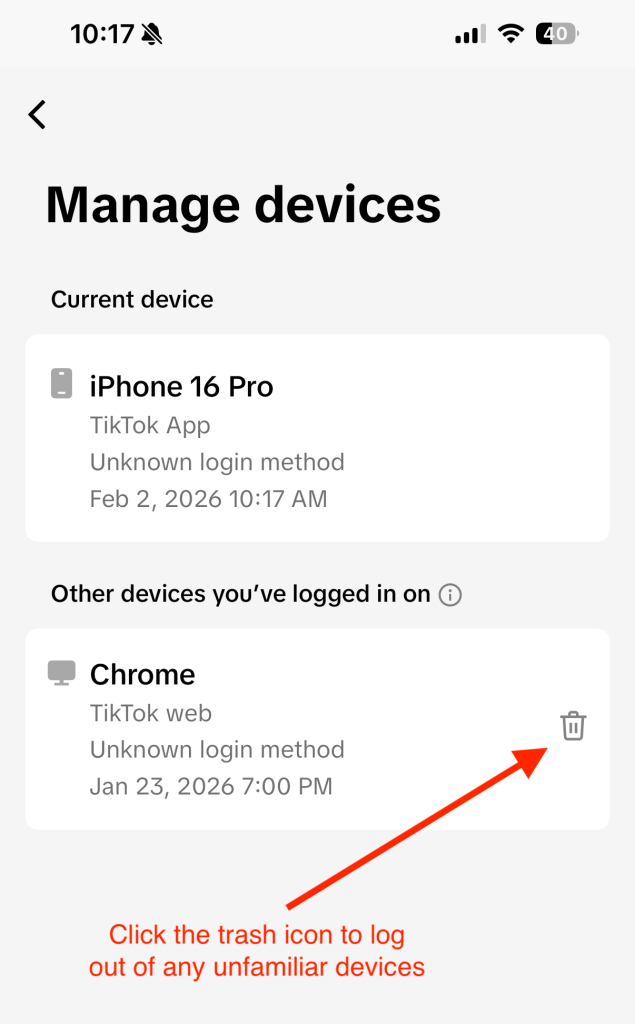
Figure 1: How to remove TikTok logins from other devices.
Lock Down Sessions and Strengthen Your TikTok Security
Getting back in is only half the job. The next step is making sure whoever got in can’t come back.
Turn on two-step verification
In Settings & Privacy, enable two-factor verification (2FA) and choose your preferred method. An authenticator app offers the strongest protection, but SMS or email is still far better than nothing.
Review active sessions and devices
Head to Security and look for Manage devices or Active sessions.
- Remove any devices you don’t recognize.
- If available, use “Log out of all devices” to force everyone, including an attacker, out at once.
Revoke third-party app access
Check which apps or tools are connected to your TikTok account and remove anything you don’t use or trust.
Use a strong, unique password
- Aim for 12+ characters with a mix of letters, numbers, and symbols.
- Never reuse passwords from other sites.
- A reputable password manager like McAfee’s can help generate and store secure passwords.
Keep your app and phone updated
Updates often include security fixes. Running outdated software makes it easier for attackers to exploit known issues.
Be cautious with links and messages
Unexpected DMs, “copyright warnings,” fake verification notices, or links asking you to log in again are common hacker tactics. When in doubt, don’t click, open the app directly instead.
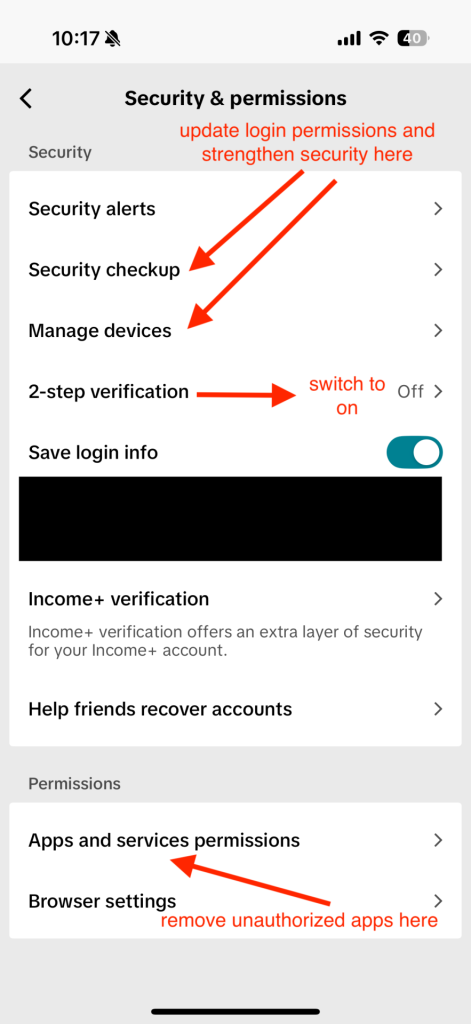
Figure 2: Where in “Security & permissions” to find security updates and 2FA.
How to Report an Impersonation Account on TikTok
Discovering a fake account that’s using your name, photos, or videos can feel like a second violation on top of having your account hacked.
Luckily, TikTok has a way to flag these imposters, both from inside the app and, in some regions, through an official web form.
- Open the impostor’s profile: Head to the account that’s pretending to be you.
- Tap the share icon: On mobile, this is usually the arrow at the top of the profile.
- Select “Report”: Choose the option to report the account.
- Choose “Report account” → “Pretending to Be Someone”: That’s TikTok’s way of flagging impersonation specifically.
- Indicate who is being impersonated: Select Me if it’s your identity, or Celebrity/Another person if it’s someone else. Then submit.
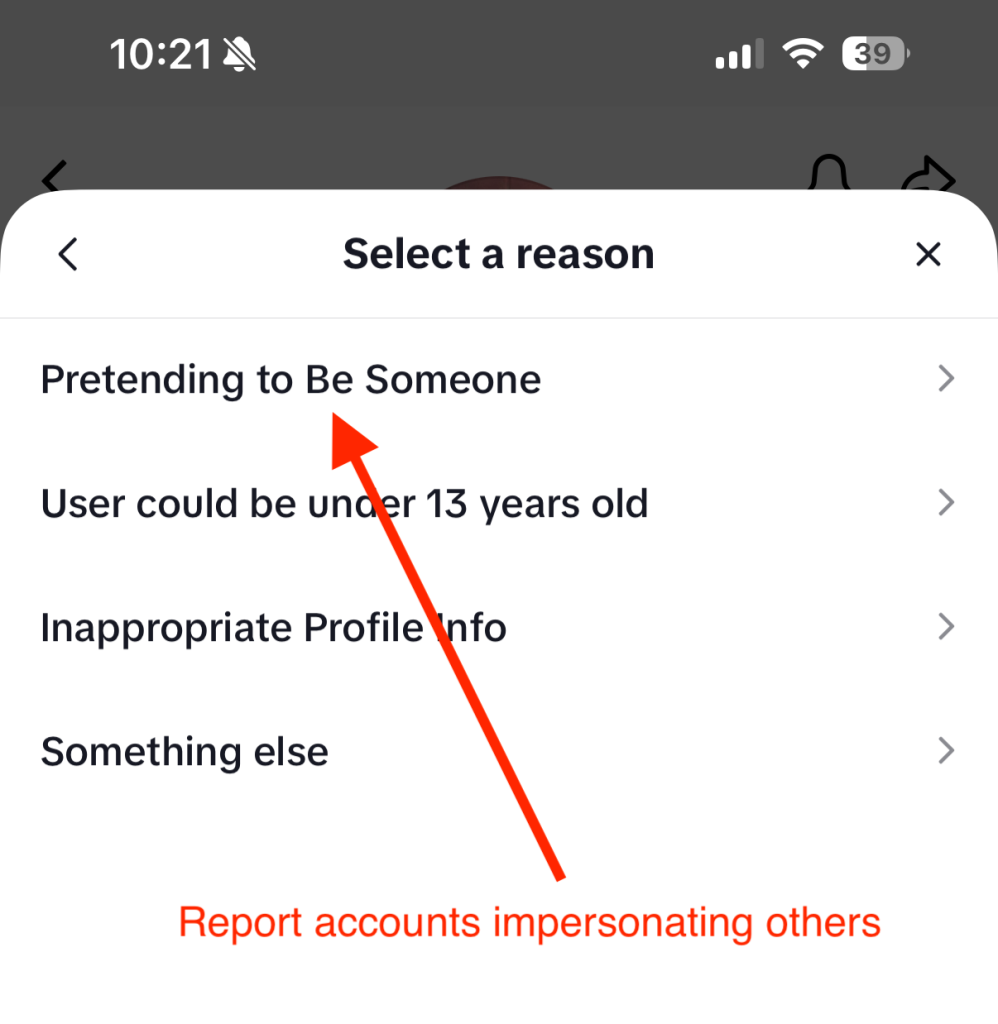
Figure 3: A screenshot showing where in TikTok you report fake profiles.
If you’re in the U.S. and the fake profile is doing real damage, for example, scamming your followers or using official business assets, TikTok also offers a dedicated impersonation report form online:
- Choose whether you’re reporting or appealing an impersonation.
- Enter your email and country.
- Upload valid ID or other proof that you’re who you say you are.
- Confirm the statements and submit the form.
For accounts outside the U.S., the public Help Center form lets you select Report a potential violation → Account violation → Impersonation and walk through similar steps.
Frequently Asked Questions
| Q: How do I lock down sessions on TikTok? A: Go to Settings & Privacy → Security, then open Manage devices or Active sessions. Remove unfamiliar devices, log out of all sessions if possible, change your password, and enable two-step verification. |
| Q: Can I recover my account if the email and phone number were changed? A: Yes. Start an account recovery request through TikTok support and provide proof of ownership, including previous contact details and device information. |
| Q: What if I keep getting verification codes I didn’t request? A: That’s a sign someone is trying to get in. Change your password immediately, enable two-step verification, and review active sessions. If it continues, contact TikTok support |
| Q: Should I warn my followers? A: If your account posted or messaged others without your permission, yes. Let people know your account was compromised so they don’t engage with scam links or requests. |

Stay Updated
Follow us to stay updated on all things McAfee and on top of the latest consumer and mobile security threats.